By the Minana Tech team · Published 15 October 2026
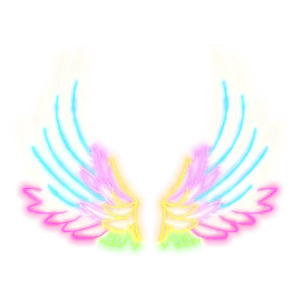
Glowing Carnival Wings are neon wings that glow in rainbow colours: white, light blue, pink, yellow and green. They are made of bright lines that form full feathers.
The creator is THINK DIFFERENT, and the Roblox catalog lists Glowing Carnival Wings as a back accessory with UGC Limited status. When we checked on 20 November 2026, the price was 0 Robux. Total stock is 500, and 361 were left on 17 November 2026. The item is handed out inside the game My Avatar!, not through a button on the catalog page.
How to get Glowing Carnival Wings
- Open My Avatar! with the button at the top of this page.
- Collect Points. The description says Points are earned whenever you buy an item inside the game, and signing up to Roblox Plus through My Avatar! gives 1,000 Points.
- Open the Point Store, find Glowing Carnival Wings, and check how many Points it asks for.
- Redeem your Points while stock lasts, then check your Roblox inventory.
The catalog price of these items is 0 Robux, but Points in this game come mainly from purchases. Items from My Avatar! are therefore harder to reach without shopping than items from games that pay out for playtime. The description also mentions a new free Point Store item when the game reaches a certain share of likes. Do not buy anything just for Points without a parent's permission.
We have not tested the steps ourselves, so the exact requirement for Glowing Carnival Wings has to be read in the game.
How to wear Glowing Carnival Wings
- Open the Avatar menu in Roblox once the item is in your inventory.
- Go to back accessories and select Glowing Carnival Wings.
- Check the preview from the front, side and back before saving.
This item uses the back accessory slot. Wings, bags, capes and back weapons sit in the same place, so remove other back items to stop them clipping through each other.
About the game My Avatar!
My Avatar! is a catalog game by THINK DIFFERENT. Inside you can browse the Roblox catalog, try items on your avatar and look at outfits made by other players.
The game has a Point Store with more than a hundred accessories. Items bought in the game go to your Roblox inventory and work in every game.
My Avatar! was made by THINK DIFFERENT and opened in April 2025. By 17 November 2026 it had about 518 million visits. Read the full My Avatar! guide.
Design of Glowing Carnival Wings
The wings are built from glowing neon lines shaped into spread feathers. The colours fade from white and blue at the top to pink, yellow and green at the bottom, like carnival lights.
The glow effect looks strongest in dark scenes or at night. They suit a party, a festival or a cheerful fantasy theme, and plain clothes keep the colours clear.
Outfit ideas with Glowing Carnival Wings
- Night festival: Roblox T Shirt Black with dark trousers.
- Party look: all black outfit so the wings stand out.
- Cheerful fantasy: neutral clothes with a light hair colour.
Is it worth getting?
The catalog price is 0 Robux, so the real cost of Glowing Carnival Wings is whatever My Avatar! asks for, as described above.
Stock is still comfortable: 361 of 500 were left on 17 November 2026.
Stock and limit
Stock of Glowing Carnival Wings is capped at 500 copies for all players. The per-account limit is not recorded in the catalog. The stock number at the top of this page updates automatically.
A price of 0 Robux is the catalog price, not a promise that the item can be had without meeting the in-game requirement. Everything happens inside Roblox. Never give your password or a verification code to anyone offering this item.
FAQ about Glowing Carnival Wings
Is it really free?
The catalog price of Glowing Carnival Wings was 0 Robux when we last checked on 20 November 2026. You still have to meet the requirement inside My Avatar!.
Why can’t I get it from the catalog page?
UGC Limited items like this one are sold only inside an experience. The catalog page shows the item, but the reward is collected in My Avatar!.
What happens when the stock runs out?
The item can no longer be collected in the game. This page stays online and shows the item as sold out.
