By the Minana Tech team · Published 20 October 2026
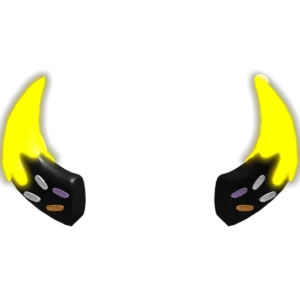
Glowing Halloween Horns have black bases with bright yellow tips and small candy-like details. The silhouette is simple, but the dark and neon colours draw attention to the head.
The creator is Galanto Studios, and the Roblox catalog lists Glowing Halloween Horns as a head accessory with UGC Limited status. When we checked on 19 November 2026, the price was 0 Robux. Total stock is 40, and 7 were left on 17 November 2026. The item is handed out inside the game Sleep For UGC, not through a button on the catalog page.
How to get Glowing Halloween Horns
- Open Sleep For UGC with the button at the top of this page.
- Collect coins by sleeping, or pick up coins scattered around the map.
- Hatch pets from Shards if you want coins to come in faster.
- Open the reward list, check the coin cost of Glowing Halloween Horns, redeem it, then check your Roblox inventory.
The description lists two boosts: 25 percent more coins for Plus players and 25 percent for members of the developer's group. Both are optional. The developer announces new UGC and codes through its group and community server, so new items can appear beyond the ones recorded here.
We have not tested the steps ourselves, so the exact requirement for Glowing Halloween Horns has to be read in the game.
How to wear Glowing Halloween Horns
- Open the Avatar menu in Roblox once the item is in your inventory.
- Go to head accessories and select Glowing Halloween Horns.
- Check the preview from the front, side and back before saving.
This item is worn on the head. Some large hairstyles or other hats can clip through it, so try a few hairstyles until one sits cleanly.
About the game Sleep For UGC
Sleep For UGC is a game by Galanto Studios with a simple idea: your character sleeps, and while it sleeps you earn coins. Those coins are exchanged for free UGC items.
Sleeping also earns Shards, which are used to hatch pets. According to the description, every pet adds to your coin income.
Sleep For UGC was made by Galanto Studios and opened in July 2025. By 17 November 2026 it had about 28 million visits. Read the full Sleep For UGC guide.
Design of Glowing Halloween Horns
The horns start with black bases and end in bright yellow tips. Small candy-like details are added to the design, so the horns look playful as well as dark.
Black or dark grey clothes keep the yellow readable, and a little orange adds Halloween feeling. Short hair shows the base of the horns, and glow can look different between games and graphics settings.
Outfit ideas with Glowing Halloween Horns
- Halloween: black clothes with a little orange.
- Dark grey: a dark grey outfit so the yellow stands out.
- Simple: plain clothes and short hair.
Is it worth getting?
The catalog price is 0 Robux, so the real cost of Glowing Halloween Horns is whatever Sleep For UGC asks for, as described above.
Stock is running low: 7 of 40 were left on 17 November 2026, so check the live number at the top of this page before you start.
Stock and limit
Stock of Glowing Halloween Horns is capped at 40 copies for all players. The per-account limit is not recorded in the catalog. The stock number at the top of this page updates automatically.
A price of 0 Robux is the catalog price, not a promise that the item can be had without meeting the in-game requirement. Everything happens inside Roblox. Never give your password or a verification code to anyone offering this item.
FAQ about Glowing Halloween Horns
Is it really free?
The catalog price of Glowing Halloween Horns was 0 Robux when we last checked on 19 November 2026. You still have to meet the requirement inside Sleep For UGC.
Why can’t I get it from the catalog page?
UGC Limited items like this one are sold only inside an experience. The catalog page shows the item, but the reward is collected in Sleep For UGC.
What happens when the stock runs out?
The item can no longer be collected in the game. This page stays online and shows the item as sold out.
