By the Minana Tech team · Published 14 October 2026
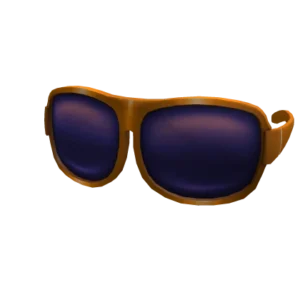
Orange Shades are sunglasses with thick orange frames and wide, rounded lenses in a dark purple. They cover most of the eye area of the avatar.
The creator is Roblox, and the Roblox catalog lists Orange Shades as a face accessory. When we checked on 19 November 2026, the price was 0 Robux, and the item can be taken straight from its catalog page.
How to get Orange Shades
- Open the item’s Roblox catalog page with the button at the top of this page.
- Log in to your Roblox account in the browser or in the app.
- Press the Get button. The price next to it should read Free.
- Open the Avatar menu and look for Orange Shades under face accessories.
If the page shows a Robux price instead of Free, the item is no longer free. Check the status at the top of this page first so you do not buy it by accident.
How to wear Orange Shades
- Open the Avatar menu in Roblox once the item is in your inventory.
- Go to face accessories and select Orange Shades.
- Check the preview from the front, side and back before saving.
This item sits on the face. Masks, glasses and other face items share the same area, so wear one at a time to keep the face from looking crowded.
Design of Orange Shades
The lenses are wide and slightly pointed at the outer corners, with a faint lighter reflection in the middle. The arms are orange as well and show clearly from the side of the face.
Orange and dark purple sit opposite each other on the colour wheel, so the contrast is strong but pleasant. Because the lenses are dark, the eyes are hidden and the face looks calm and a little mysterious.
Outfit ideas with Orange Shades
- Beach: Bermuda Shorts Black, a plain T-shirt and the shades.
- All orange: Orange Beanie with Black Hair for a warm one-colour look.
- Bold dark: Zip Hoodie Black and Wetsuit Pants Black.
Is it worth getting?
Orange Shades has no in-game requirement, so taking it only adds one more item to your inventory. You can leave it unworn and come back to it when it fits an outfit.
Items like this are a simple way to try a different look without spending Robux.
Price and availability
The catalog does not show a stock limit for Orange Shades, but the creator can take an item off sale or set a price at any time. The status at the top of this page updates automatically.
Everything happens on the official Roblox catalog. Never give your password or a verification code to anyone who offers this item.
FAQ about Orange Shades
Is it really free?
The catalog price of Orange Shades was 0 Robux when we last checked on 19 November 2026. The price shown on Roblox is the one that counts.
Do I need Robux for it?
No Robux is needed while the catalog price is 0. If Roblox shows a price, the item is no longer free.
Where does it go after I get it?
It is added to your Roblox inventory. Open the Avatar menu to put it on.
