By the Minana Tech team · Published 20 October 2026
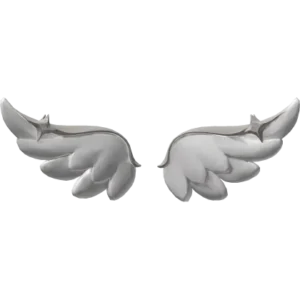
White Angel Wings with Silver Stars are compact white wings with silver details along the top. They are lighter than tall fantasy wings and keep an avatar simple.
The creator is TwinLabs, and the Roblox catalog lists White Angel Wings with Silver Stars as a back accessory with UGC Limited status. When we checked on 20 November 2026, the price was 0 Robux. Total stock is 50, and 44 were left on 17 November 2026. The item is handed out inside the game FREE UGC Grind 2, not through a button on the catalog page.
How to get White Angel Wings with Silver Stars
- Open FREE UGC Grind 2 with the button at the top of this page.
- Collect points. The description names four sources: points over time, 100 points per obby checkpoint, 100 points per 1v1 PvP kill, and 10,000 to 30,000 points from quests.
- Open the reward list, match the item name and picture, and check how many points it asks for. Each item has its own target.
- Redeem your points while stock lasts, then check your Roblox inventory.
The description lists three boosts: 10 percent more points for members of the developer's group, 15 percent for Premium users, and 3,000 points for every friend invited. All of them are optional. The developer bans exploits, scripts, bots and hacks. Earn points by playing normally.
We have not tested the steps ourselves, so the exact requirement for White Angel Wings with Silver Stars has to be read in the game.
How to wear White Angel Wings with Silver Stars
- Open the Avatar menu in Roblox once the item is in your inventory.
- Go to back accessories and select White Angel Wings with Silver Stars.
- Check the preview from the front, side and back before saving.
This item uses the back accessory slot. Wings, bags, capes and back weapons sit in the same place, so remove other back items to stop them clipping through each other.
About the game FREE UGC Grind 2
FREE UGC Grind 2 is a game by TwinLabs that combines an obby, one-on-one fights and an AFK mode. All of them earn points, and points are exchanged for free UGC items.
Progress is not lost when you leave. According to the game description, points are saved automatically, so you can build them up a little at a time over several sessions.
FREE UGC Grind 2 was made by TwinLabs and opened in June 2026. By 17 November 2026 it had about 4.8 million visits. Read the full FREE UGC Grind 2 guide.
Design of White Angel Wings with Silver Stars
The wings are white and fairly small, with silver star-like details on the upper part. The shape stays close to the back instead of rising high.
White, light grey or pale blue clothes follow the soft tone of the wings. A small head accessory keeps the focus on the wings, and long hair or bags can cover them.
Outfit ideas with White Angel Wings with Silver Stars
- Angel: white dress and small silver hairpin.
- Soft: pale blue top with light grey trousers.
- Simple: white t-shirt and plain light jeans.
Is it worth getting?
The catalog price is 0 Robux, so the real cost of White Angel Wings with Silver Stars is whatever FREE UGC Grind 2 asks for, as described above.
Stock is still comfortable: 44 of 50 were left on 17 November 2026.
Stock and limit
Stock of White Angel Wings with Silver Stars is capped at 50 copies for all players. The per-account limit is not recorded in the catalog. The stock number at the top of this page updates automatically.
A price of 0 Robux is the catalog price, not a promise that the item can be had without meeting the in-game requirement. Everything happens inside Roblox. Never give your password or a verification code to anyone offering this item.
FAQ about White Angel Wings with Silver Stars
Is it really free?
The catalog price of White Angel Wings with Silver Stars was 0 Robux when we last checked on 20 November 2026. You still have to meet the requirement inside FREE UGC Grind 2.
Why can’t I get it from the catalog page?
UGC Limited items like this one are sold only inside an experience. The catalog page shows the item, but the reward is collected in FREE UGC Grind 2.
What happens when the stock runs out?
The item can no longer be collected in the game. This page stays online and shows the item as sold out.
